
Note Format Management in EHR
This guide explains how EHR Practice Admins configure and manage Note Formats to support provider documentation workflows.
Note Formats are centrally managed and can be made available based on provider specialty taxonomy, helping ensure the right note formats are available to the right providers. This guide covers how to enable Note Formats in the EHR, assign specialty taxonomies to providers, and manage user permissions for Note Format Management.
Notes
Access to Note Format Management needs to be enabled for your practice. To request access or confirm availability, please contact your Account Manager.
Workflow
- Enable Note Format in EHR (Practice Admin)
- Assigning Specialty Taxonomy to Providers
Enable Note Format in EHR (Practice Admin)
Note formats configured by WRS Admin are available in the EHR based on provider specialty taxonomy. To make these formats available during documentation, Practice Admins must enable them in Note Format Management.
Notes
The existing note format inheritance from Administration → Practice Setup → Edit Specialty is being retained to preserve current functionality. Providers can also access WRS Admin-configured note formats based on provider’s specialty taxonomy, giving them a wider selection when setting their preferred note format.
Before disabling a note format, Practice Admins should confirm whether it is already being used in a patient EMR or set as a provider’s default note format. Disabling an active note format may affect documentation workflows and note availability.
Steps:
- Login to your EHR.
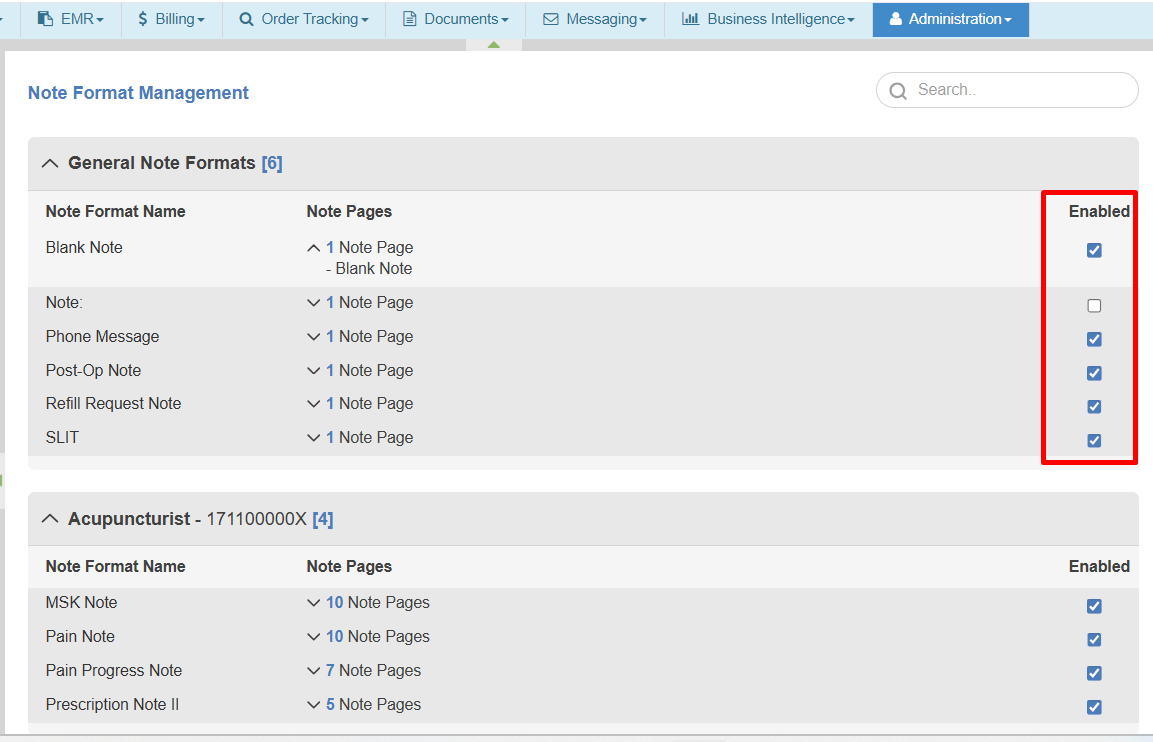
- Go to Administration → EMR Setup → Note Format Management.
- Enable the note format under each category.
Notes
Enabled note formats will be available in the EMR Notes section when documenting patient encounters. Providers can continue assigning their default note format using the existing workflow.
Assign Specialty Taxonomy to Providers
Assigning a specialty taxonomy to providers ensures they have access to the appropriate Note Format based based on their clinical role. This helps align documentation with specialty-specific workflows.
- Login to your EHR.
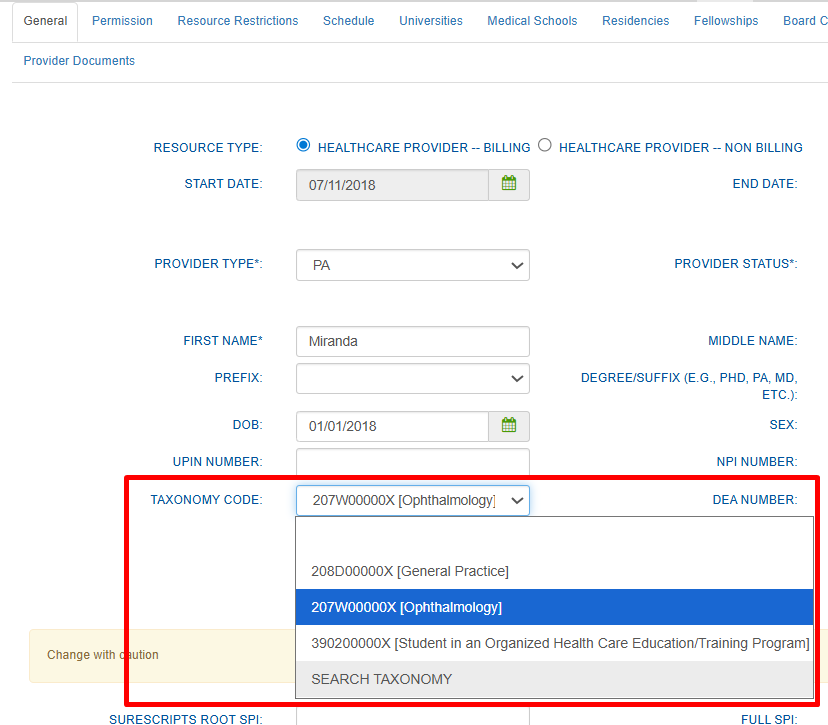
- Navigate to Administration → Resource Management → Resource Setup.
- Select the provider’s name.
- Under General → Taxonomy Code, search for or select the provider’s specialty taxonomy.

- Click Save to update changes.

Still no luck? We can help!
Contact us and we'll get back to you as soon as possible.
Submit a Request