
Configure Expected Date of Completion (DOC) when Creating Orders in EHR
GO TO
Administration → Order Tracking Setup → Edit Practice OTS Settings
STEPS
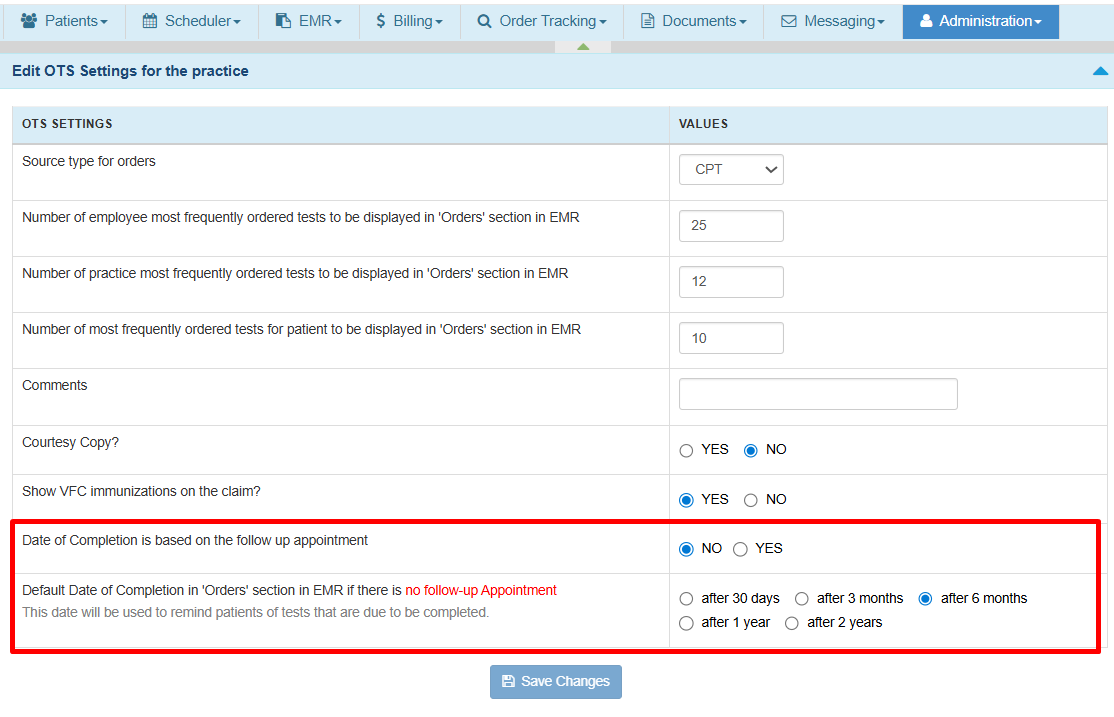
- Locate the setting Date of Completion is Based on Follow-Up Appointments.

-
Select one of the following options:
Yes:
When a follow-up appointment is linked to the order, the system calculates the Expected DOC based on the follow-up appointment date minus the configured offset (Days, Weeks, or Months). This helps ensure tests or procedures are completed before the follow-up visit.Clinical Example
Follow-up Appointment Date: March 30
Configured Offset: 2 Weeks Before
Expected Completion Date: March 16No:
Expected DOC will always be calculated using the default completion timeframe regardless of whether a follow-up appointment exists.Clinical Example
Follow-up Appointment Date: no effect
Order Created Date: February 16
Configured Offset: after 6 Months
Expected Completion Date: August 16 - Set the Default Date of Completion rule (for example: After X Days, Weeks, or Months). This rule is applied when:
- Expected DOC based on follow up is set to Yes (from Step 2) but No follow-up appointment exists, or
- The follow-up rule is disabled (No from Step 2).
Clinical Example
Order Created Date: February 16
Configured Offset: after 6 Months
Expected Completion Date: August 16 - Click Save to apply changes. The updated configuration will automatically apply to all new orders.



Where to Find the Expected Date of Completion (DOC)
The Expected DOC is displayed in the following workflows:
- When creating orders from the Orders and Procedures note
- When filtering orders from the Order Tracking page
For a complete walkthrough of both workflows, please refer to the full Order Tracking Management guide.

Still no luck? We can help!
Contact us and we'll get back to you as soon as possible.
Submit a Request