
Setup and Configure Copay Service Type
To ensure accurate copay determination based on eligibility data, Copay Service Types must be properly configured at both the practice and provider levels. This setup enables the system to align copay values with payer-defined service categories and apply them correctly during patient check-in.
There are two steps required to configure the Copay Service Type:
- Contact your account manager to enable and define available Copay Service Types for your practice.
- Assign the appropriate Copay Service Type per provider based on their services.
Assign Copay Service Type to Providers in EHR
STEPS
- Login to EHR
- Navigate to: Administration → Resource Management → Resource Setup
- Search for and select the name of the provider
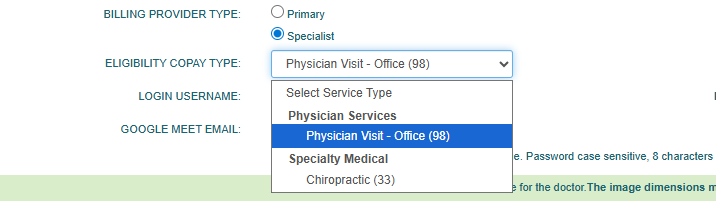
- On the General tab, locate the Eligibility Copay Type dropdown (placed under the Billing Provider type)
- Select the applicable service type of the provider, then Save changes.
Note
When the Eligibility Copay Type is not configured, or when the eligibility (271) response does not align with the selected service type, the copay will default to the amount associated with the provider’s Billing Provider Type (Primary or Specialist).

Still no luck? We can help!
Contact us and we'll get back to you as soon as possible.
Submit a Request