
| To: | WRS Health Users |
|---|---|
| From: | WRS Development Team |
| Date: | 02/20/2026 |
| Re: | OTS Enhancements: Expected DOC Settings for Orders |
Items in This Release
- Expected Completion Date Settings for Orders
We are pleased to introduce a new enhancement that allows Practice Administrators to configure how the system calculates the Expected Date of Completion (DOC) for orders. This update improves order tracking and helps ensure that patients are reminded when tests or procedures are due.
Previously, expected completion dates relied on fixed logic, which limited flexibility for practices with different workflows. With this enhancement, administrators can now define whether completion dates should be based on follow-up appointments or a default timeframe when no follow-up appointment exists. This provides better control over order tracking and supports more accurate patient reminders.
What’s New
- Practice Administrators can now configure how the Expected Completion Date is calculated for orders.
- Option to automatically set completion dates based on follow-up appointments
- Default completion timeframe applied when no follow-up appointment is scheduled.
- Supports improved order tracking and patient reminder workflows.


Why this Matters for Your Practice
- Improves order tracking accuracy by aligning completion dates with follow-up schedules.
- Helps ensure patients receive timely reminders for tests and procedures.
- Provides flexibility to match your practice’s workflow and clinical processes
- Reduces manual tracking and improves efficiency in managing orders.
How It Works
Practice Administrators can configure Expected DOC settings from Administration → Order Tracking Setup → Edit Practice OTS Settings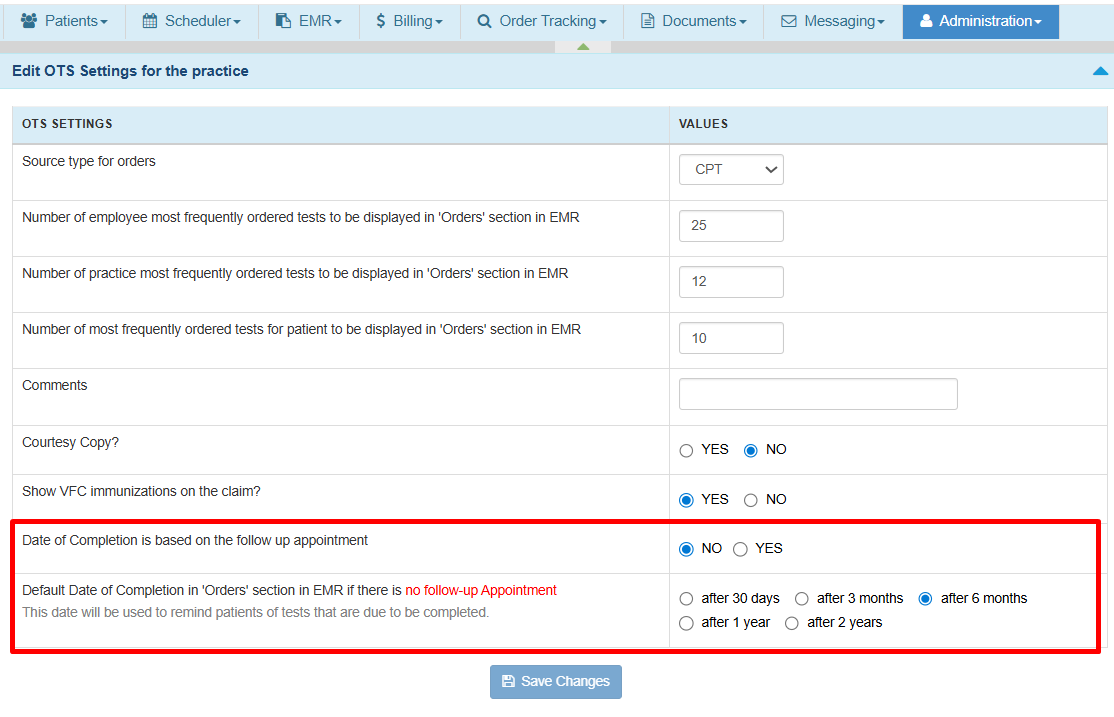
- Date of Completion is Based on Follow up Appointments
When this setting is enabled (Yes), the Expected DOC is automatically calculated based on one of the following scenarios:- When a Follow-Up Appointment Exists
When a follow-up appointment is linked to the order, the system calculates the Expected DOC based on the follow-up appointment date minus the configured offset (Days, Weeks, or Months). This helps ensure tests or procedures are completed before the follow-up visit.
Clinical Example:
- Follow-up Appointment Date: March 30
- Configured Offset: 2 Weeks Before
- Expected Completion Date: March 16
- When No Follow-Up Appointment Exists
If no follow-up appointment exists, the system automatically applies the default completion timeframe configured in settings.
Clinical Example:
- Order Creation Date: February 16
- Default Rule: after 6 months
- Expected Completion Date: August 15
- When a Follow-Up Appointment Exists
- When the Follow-Up Rule is Disabled
If the follow-up appointment rule is set to NO, the system always uses the default completion date setting regardless of whether a follow-up appointment exists.
Clinical Example:
- Order Creation Date: February 16
- Default Rule: after 6 months
- Expected Completion Date: August 15
- Order Tracking
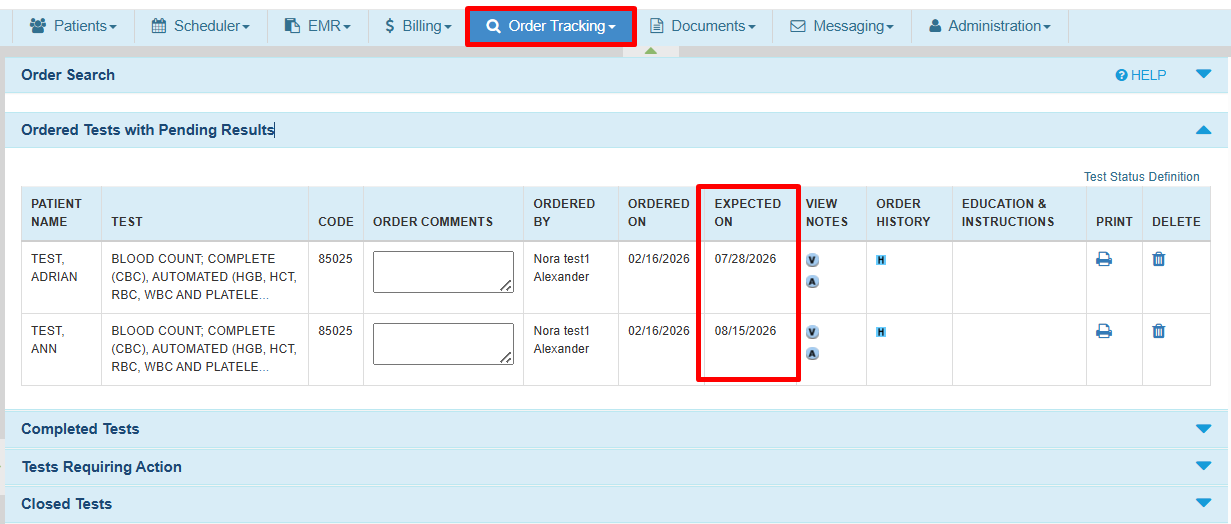
The Expected DOC is also shown in the Order Tracking search results list, helping users quickly identify orders that are due or approaching completion.



For the complete provider workflow, please visit Order Tracking Management to review the full guide.
Alternatively for this specific release you may check How to Configure Expected DOC in EHR.

If you would like more information, please contact your account manager.
Contact Your Account Manager