AI Scribe Ambient Listening – 30 Day Free Trial Now Available
Enable the AI Scribe Ambient Listening Into Your EHR to Use the Feature
You can now complete your clinical documentation before your patient leaves the room. Ambient Listening listens to the encounter and automatically generates structured, specialty-aligned clinical notes directly into your EHR — reducing after-hours charting and improving documentation consistency.
Before using this feature, please complete the required setup:
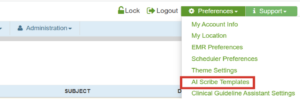
1. Enable AI Template – Go to Preferences > AI Scribe Template.
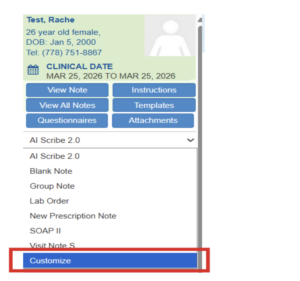
2. Select AI Scribe 2.0 Note Type – Go to EMR Note > Customize > AI Scribe 2.0.
To learn how it works, click here to view WRS Ambient Listening.
If you would like help enabling this feature or scheduling a quick walkthrough, please contact our Account Management Team at accountmanagement@wrshealth.com.