
Payments Using ACH (Bank Transfer)
This guide explains how staff can process patient payments securely using ACH (Bank Transfer), allowing patients to pay directly from their bank account.
STEPS
- Open the Patient’s Account page.
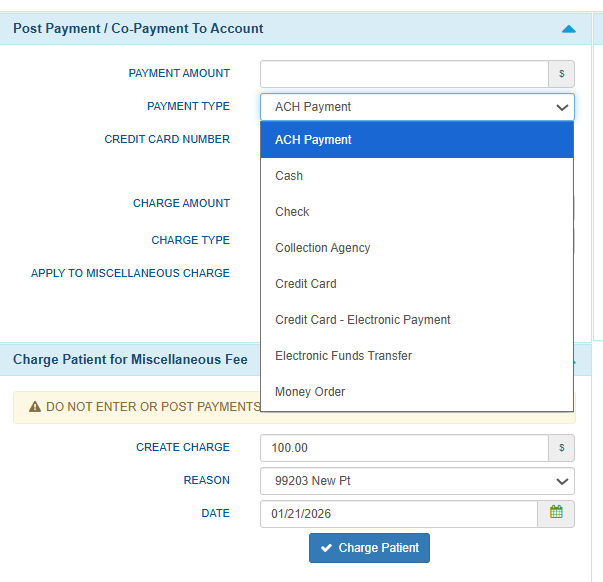
- Enter the Payment Amount.
- Select Payment Type → ACH Payment.

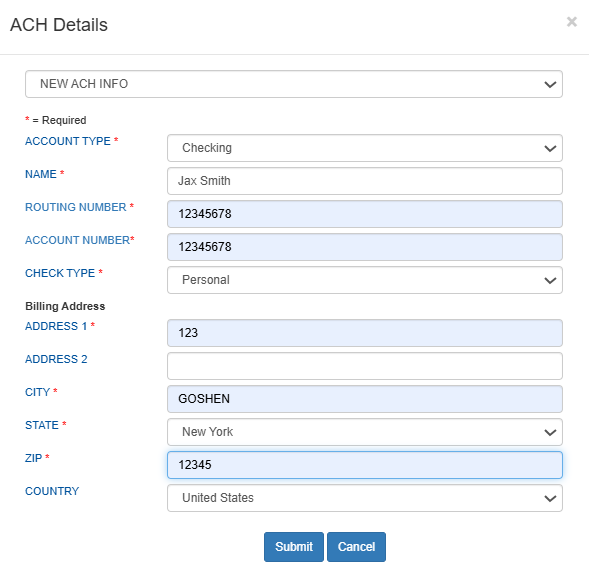
- Select ACH and enter bank details.
- From the payment method dropdown, select ACH (Bank Transfer).
- Enter the required bank information:
- Account Type (Checking or Savings)
- Account Holder Name
- Routing Number
- Account Number
- Check Type
- Billing Address
- Review details and Submit.

- Confirm Payment.
- Once submitted, the payment will appear in Patient Payments.

- Once submitted, the payment will appear in Patient Payments.
- Print Receipts (Optional).
- Click Print Receipt to provide a copy.
- Two receipts will be generated: Practice Copy and Patient Copy.

Notes
- ACH payments typically take 1–3 business days to process.
- Pending status: Payments may appear as Pending until processing is completed.

Still no luck? We can help!
Contact us and we'll get back to you as soon as possible.
Submit a Request