
| To: | WRS Health Users |
|---|---|
| From: | WRS Development Team |
| Date: | 10/17/2025 |
| Re: | Insurance Display in Current Charts |
Items in this Release
- Insurance Display in Current Charts
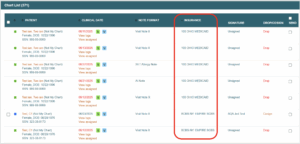
To enhance workflow efficiency for providers performing cosign actions, a new Insurance column has been added to the Current Charts list within the EMR module. This enhancement allows providers and staff to easily identify patients by their active primary insurance directly from the chart view, reducing dependency on manually generated billing lists and improving overall cosign accuracy and speed.
What’s New
- New Insurance Column
Displays each patient’s active primary insurance in the Current Charts table, positioned between Note Format and Signature.
- Sorting & Filtering
Users can sort the list by insurance name (A–Z or Z–A) and combine it with other filters such as date, note type, employee, or location.
- Improved Cosign Workflow
Providers or delegated staff can now visually identify and group patients by insurance—for example, to bulk cosign all except specific carriers (e.g., Empire BCBS).
The new column has been optimized to ensure no added latency or slowdown when loading or filtering the Current Charts view and is now available across all practices using the EMR module.

If you would like more information, please contact your account manager.
Contact Your Account Manager